Introduction
A family-owned restaurant was losing 15 hours every week to tasks that should have been automated. The owner, who had invested in a solid POS system and built a loyal customer base over eight years, was spending more time wrestling with technology gaps than focusing on the food and hospitality that made the restaurant successful.
The problem was not the POS itself. The POS handled point-of-sale transactions competently. The problem was everything between the POS and the rest of the business: the manual order re-entry from the website, the spreadsheet-based reporting, the tedious multi-platform menu updates, and the hand-counted inventory reconciliation. These gaps between systems were consuming the owner's time, introducing errors, and limiting the restaurant's ability to grow.
We built a custom integration layer that connected the restaurant's website to its existing POS system, automated the manual workflows, and gave the owner back those 15 hours every week. This is the story of that project, the approach we took, and the measurable results it delivered.
To be clear about our role: KG ProDesign builds restaurant websites and custom web integrations that work with your existing POS system. We are POS-agnostic. We do not sell, resell, or exclusively partner with any POS vendor. We build the web layer that makes your current POS work harder for your business.
The Problem: Death by Manual Tasks
When we sat down with the restaurant owner for our discovery session, we asked a simple question: "Where does your time go each week that you wish it did not?" The answer was a list of manual tasks that had accumulated gradually over years, each one seeming minor in isolation but devastating in aggregate.
Order Entry: 4 Hours Per Week
The restaurant had a website with an online ordering page, but it was essentially a digital menu with a phone number. Customers would browse online, then call in their orders. Staff would take the order by phone and manually enter it into the POS. During busy periods, this meant a dedicated staff member on the phone for hours, and a 3 to 5 percent error rate on orders that were misheard, mistyped, or entered into the wrong ticket.
The website and the POS were two completely disconnected systems. Orders existed in one world or the other, never both.
Reporting: 3 Hours Per Week
Every Monday morning, the owner exported the previous week's sales data from the POS into a CSV file, opened a spreadsheet, and manually organized the numbers into a format that was actually useful for business decisions. Revenue by day, revenue by category, average ticket size, peak hours, labor cost ratios. The POS had some reporting built in, but it did not provide the specific views the owner needed to run the business effectively.
Three hours of every Monday were consumed by data manipulation that a computer could perform in seconds.
Menu Updates: 4 Hours Per Week
The restaurant's menu was not static. Seasonal items, price changes, sold-out specials, and new additions happened weekly. Every change needed to be made in three places: the POS system, the restaurant's website, and two third-party delivery platforms. The process was entirely manual. Update the POS. Screenshot or retype the changes for the website. Log into each delivery platform and make the same changes again.
Inevitably, prices would drift out of sync. The website would show $14 for an entree while the POS charged $15 and the delivery app listed $16. These inconsistencies eroded customer trust and created headaches at checkout.
Inventory Reconciliation: 4 Hours Per Week
The POS tracked what was sold, but it had no connection to what was on hand. Inventory counts were performed manually, usually on Sunday evenings after close. The owner walked through the kitchen and storage areas with a clipboard, counted everything, and entered the numbers into yet another spreadsheet. When actual counts did not match expected counts based on sales, there was no system to investigate why. Waste, theft, and over-portioning were invisible until the end-of-month profit and loss statement revealed the damage.
The total: approximately 15 hours per week of manual, error-prone, repetitive work that added no value to the customer experience and drained the owner's energy and focus.
The Solution: A Custom Integration Layer
Our approach was straightforward. We did not replace the restaurant's POS system. The POS worked well for its core purpose: processing transactions at the counter. What we built was a web-based integration layer that sat between the restaurant's customer-facing website and its existing POS, automating the data flow that had previously required manual intervention.
Online Ordering Connected Directly to the POS
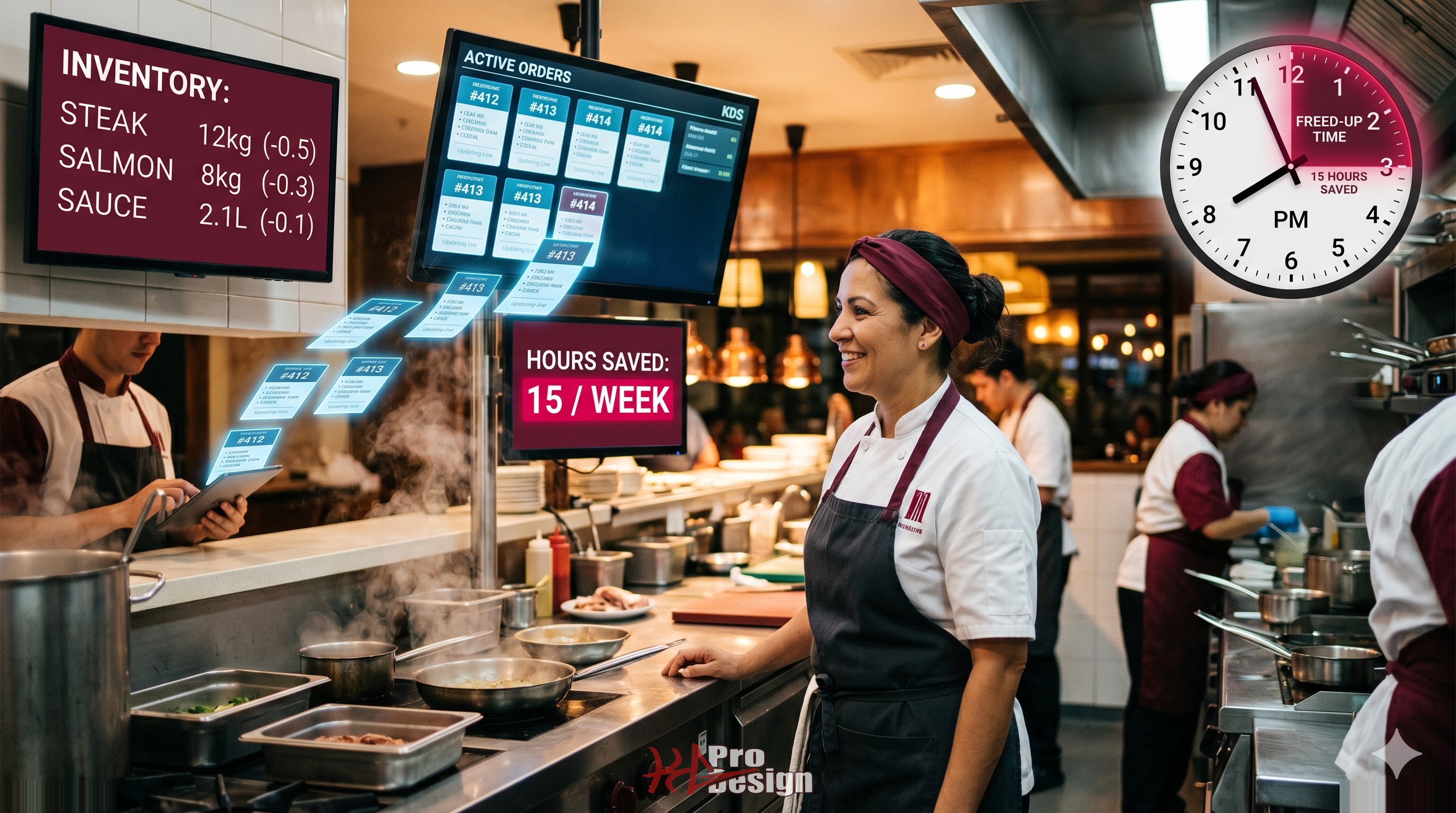
We rebuilt the restaurant's online ordering experience as a modern, mobile-first web application. Customers could browse the menu, customize their orders, and submit them directly through the website. The critical difference from the old system: orders submitted through the website were automatically pushed to the POS via its API. They appeared on the kitchen display system exactly as if they had been entered at the counter.
No phone calls. No manual re-entry. No transcription errors.
The system supported scheduled orders, special instructions, and modifier selections (extra cheese, no onions, substitute fries for salad). All of this flowed through to the POS with zero manual handling.
This integration worked with the restaurant's existing POS system because we built it against the POS vendor's published API. Our approach is POS-agnostic. Whether a restaurant uses SkyTab, Toast, Square, or another system, the integration pattern is the same: connect to the API, map the data, and automate the flow. You can see an example of this kind of restaurant web integration at our SkyTab demo site.
Automated Reporting Dashboard
We built a custom reporting dashboard that pulled sales data from the POS API automatically. Every morning, the owner opened a browser and saw the previous day's performance already organized into the exact views that mattered: revenue by category, hourly sales distribution, average ticket size, top-selling items, and week-over-week trends.
Weekly and monthly summary reports were generated automatically and delivered by email. No CSV exports, no spreadsheet formulas, no Monday morning data entry sessions.
The dashboard was accessible from any device with a browser. The owner could check yesterday's numbers from a phone while waiting in line at the supplier, not just from the office computer tethered to the POS back-office software.
Menu Management Hub
We created a single source of truth for the restaurant's menu. The owner made changes in one place, and those changes propagated automatically to the website, the POS system, and the connected delivery platforms.
Update a price once. Add a new item once. Mark something as sold out once. The menu management hub pushed the change everywhere simultaneously, eliminating the drift between platforms and the hours spent making the same edit in three or four different systems.
The system also supported scheduling. A seasonal special could be set to appear on the menu starting the first Friday of the month and automatically removed at the end of the promotion period. No manual intervention required.
Inventory Integration
By connecting to the POS sales data, the custom system maintained a running inventory count that adjusted in real time as items were sold. When stock levels dropped below configurable thresholds, the system generated automatic low-stock alerts sent to the owner and the kitchen manager.
This did not eliminate the need for physical inventory counts entirely. Waste and spoilage still needed to be accounted for manually. But it reduced the frequency of full counts from weekly to monthly, and it provided immediate visibility into discrepancies between expected and actual inventory levels.
The Results
The project took six weeks from kickoff to full deployment. We launched in phases, starting with the online ordering integration, then adding reporting, menu management, and inventory in subsequent weeks. Here is what the numbers looked like after the first ninety days.
15 hours per week reclaimed. The owner's time previously spent on manual data entry, spreadsheet reporting, multi-platform menu updates, and clipboard inventory counts was returned to running the business. Over a year, that represents nearly 800 hours, the equivalent of twenty full work weeks.
Zero order entry errors. The manual transcription error rate dropped from approximately five errors per week to zero. Every online order was transmitted to the POS exactly as the customer submitted it. Customer complaints about incorrect orders from online channels were eliminated.
Menu update time reduced from 2 hours to 15 minutes. Changes that previously required repetitive data entry across four platforms now required a single entry in the management hub. The 15 minutes accounted for the time to decide on the change, enter it, and review the preview before publishing.
Staff morale improved measurably. The team member who had been responsible for phone orders and manual POS entry was reassigned to front-of-house customer service. Staff surveys three months after launch showed a noticeable increase in job satisfaction, driven by the elimination of the most tedious tasks.
Return on investment in four months. The total cost of the custom integration project was recovered through a combination of labor savings, reduced order errors, and increased online ordering volume within four months of launch. Online order volume increased by 35 percent once the friction of phone ordering was removed, representing additional revenue that more than offset the technology investment.
Lessons for Restaurant Owners
This project reinforced several lessons that apply to any restaurant evaluating technology investments.
Start with your biggest time sink. Do not try to automate everything at once. Identify the single workflow that consumes the most time or introduces the most errors and start there. For this restaurant, it was order entry. For yours, it might be reporting, scheduling, or inventory. One well-executed automation delivers enough value and confidence to fund the next one.
Your POS is a data source, not a limitation. Many modern POS systems expose APIs that allow external systems to read and write data. The POS itself may not have every feature you need, but custom web integrations can unlock capabilities that the POS vendor never anticipated. You do not need to switch POS systems to get better functionality. You need a web layer that works with what you already have.
No matter which POS system you use, whether it is SkyTab, Toast, Square, Clover, or something else entirely, custom web integrations can automate the manual work around it. The specific POS matters less than the integration approach. A well-built web layer connects to any POS with an accessible API.
Measure before and after. The restaurant owner's intuition that "too much time" was being spent on manual tasks was validated by our discovery process, which quantified exactly where those hours were going. Measuring before the project established a baseline that made the results after launch undeniable and made the case for further investment straightforward.
For more on how automation transforms business operations across industries, see our article on how AI is transforming business automation.
Ready to Automate Your Restaurant Operations?
Every restaurant has manual workflows that could be automated. The question is which ones to tackle first and how to build integrations that work with your existing systems rather than replacing them.
At KG ProDesign, we specialize in building custom automation and integration solutions that connect your website to your POS and other business systems. We work with any POS platform and focus on the web layer that makes your technology investment work harder.
Contact us to discuss your restaurant's automation opportunities, or explore how we approach technology projects across industries on our portfolio page.